Quick Answer
Your Google Business Profile is usually not showing up in Search or Maps because it is unverified, suspended, marked closed, incomplete, duplicated, brand new, or simply outranked by competitors. In most cases you can find the cause in about 10 minutes by checking your verification status, your profile’s performance and notifications in Google Business Profile Manager, and then searching your exact business name plus your city. Most visibility problems are fixable once you know which of these issues applies to you.
Key Takeaways
- “Not showing up” can mean three different things: your profile can’t be found at all, it doesn’t appear for your business name, or it doesn’t appear for generic searches like “plumber near me.” Each has a different fix.
- The most common causes are missing verification, a suspension, wrong categories, an address that breaks Google’s guidelines, and duplicate listings.
- A new profile or a recent edit can take several days to appear.
- If your profile is live but ranks low, the problem is local ranking (relevance, distance, and prominence), not a technical error.
- If your business is missing from regular Google search results, your website may not be indexed, which is a separate issue from your Business Profile.
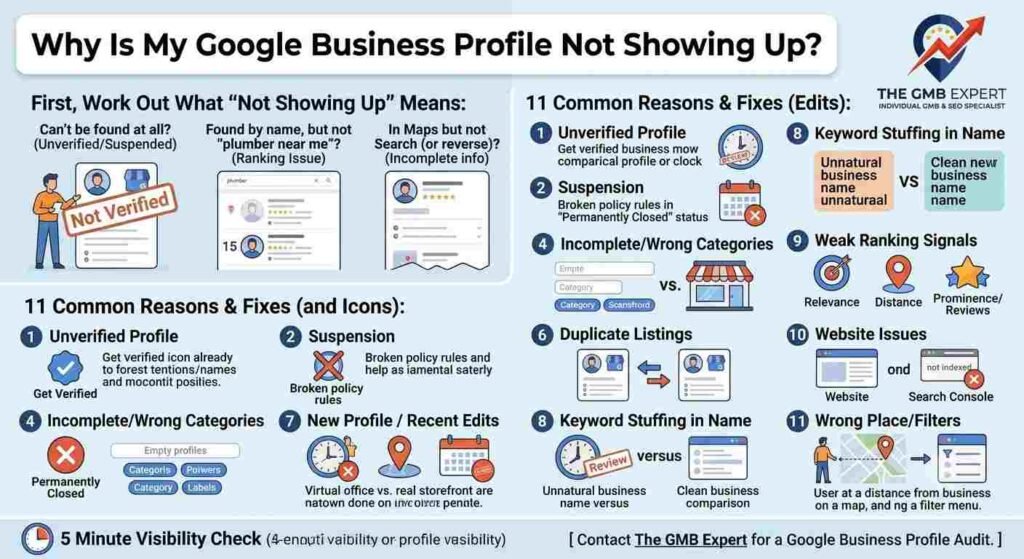
First, Work Out What “Not Showing Up” Actually Means
People search “why is my business not showing up on Google” for very different reasons. Before you try any fix, identify which situation you are in:
| What you’re seeing | What it usually means | Where to start |
|---|---|---|
| Nothing appears when you search your exact business name and city | Profile is unverified, suspended, removed, or not created | Sections 1, 2, 3 and 6 below |
| Your profile shows for your name but not for searches like “[service] near me” | A ranking problem, not a visibility error | Sections 4, 9 and 10 below |
| Your profile appears in Maps but not in Search (or the reverse) | Incomplete info, wrong categories, or a pending edit | Sections 4 and 7 below |
| Your website doesn’t appear in Google at all | Website indexing problem | The website section below |
The 11 Most Common Reasons Your Google Business Profile Isn’t Showing Up (and How to Fix Each)
1. Your profile isn’t verified
Google generally limits the visibility of unverified profiles. Verification confirms that your business is real and that you are authorized to manage it.
How to fix it: Open your profile in Google Business Profile Manager and look for a “Get verified” or verification prompt. Depending on your business, Google may offer verification by postcard, phone, text, email, or video. Postcards can take several days to arrive, so allow time and make sure the address is correct before requesting one. Enter the code exactly as shown on the postcard.
2. Your profile has been suspended
If Google believes your profile breaks its guidelines, it may suspend it. A suspended profile can disappear from Search and Maps or lose the ability to be edited. Common triggers include a fake or ineligible address, keyword-stuffed business names, and misleading information.
How to fix it: Sign in to Google Business Profile Manager and read any suspension notice. Correct the issue that caused it, then submit a reinstatement request through Google Business Profile Help. Make sure your business name, address, category, and website match your real-world business and the documents you can provide, such as a business license, utility bill, or storefront photos.
3. Your business is marked as closed
A profile marked “permanently closed” can be hidden or ranked far below active listings. A mistaken report from a user or an accidental change can cause this.
How to fix it: In your profile, check the business status and reopen the listing if it was marked closed by mistake. If you are open seasonally or temporarily closed, use the correct status and update your hours so the profile is not treated as inactive.
4. Your profile is incomplete or uses the wrong categories
Google matches businesses to searches using the information you provide. A missing primary category, no services, an empty description, or outdated hours makes it harder for Google to know when to show you.
How to fix it:
- Choose the most specific primary category that describes your main service, then add relevant secondary categories.
- Fill in your services or products, business description, hours, phone number, and website.
- Add real photos of your location, team, and work.
- Keep your information current, including holiday hours.
5. Your address or service area doesn’t follow Google’s rules
Google expects a business address to be a real location that your customers or staff can visit. Virtual offices, mailbox rental addresses, and addresses without staff during business hours are common reasons profiles are not shown or are suspended.
Service-area businesses, such as plumbers or mobile services that travel to customers, should hide their address and define their service areas instead of displaying a storefront they don’t have.
How to fix it: Confirm that your address is a legitimate location. If you serve customers at their location and have no public storefront, set up your profile as a service-area business and list the cities or regions you cover.
6. You have a duplicate listing
Two profiles for the same business can compete with each other, confuse Google, and lead to one being suppressed.
How to fix it: Search your business name, phone number, and address on Google Maps to find duplicates. Claim the correct listing, and report the duplicates for removal or request a merge through Google Business Profile Help.
7. Your profile is new or you recently made changes
New profiles and major edits, such as changing your business name, address, or categories, may go through review. During this time your profile may not appear or may not rank as expected.
How to fix it: Wait a few days after verification or a significant edit before assuming something is wrong. During that time, make sure everything is complete and accurate, and avoid making repeated changes that could trigger more reviews.
8. Your business name violates Google’s guidelines
Your business name on Google should reflect your real-world name, as it appears on your signage, website, and stationery. Adding extra keywords or locations (for example, “Best Cheap Plumber Delhi 24/7”) can lead to suspension or reduced visibility.
How to fix it: Edit your profile so the business name matches your real name exactly. Use your categories, services, and description to communicate what you do instead.
9. Your local ranking signals are weak
If your profile shows when you search your business name but not for broader searches, you are likely facing a ranking issue. Google says local results are based mainly on three factors:
- Relevance: how well your profile matches what the person is searching for
- Distance: how close your business is to the searcher or the location they mention
- Prominence: how well known your business is, based on reviews, links, citations, and web presence
How to fix it:
- Collect genuine reviews from real customers and respond to them.
- Keep your business name, address, and phone number (NAP) consistent across your website, social profiles, and directories.
- Add services, posts, and fresh photos regularly.
- Build local mentions and links from relevant local sites.
10. Your website and citations don’t support your profile
Google cross-checks your profile against other sources. If your website is missing, slow, hard to crawl, or shows different business details, your profile has less authority.
How to fix it: Link your profile to a working website page that clearly shows your business name, address, phone number, services, and service areas. Make sure the details match your profile exactly.
11. You’re checking from the wrong place or with filters on
Google personalizes results based on location, search history, and filters such as “Open now” or rating filters. If you search from far away from your business, or use a different device or account, you may see different results than your customers do.
How to fix it: Search your business name and city in a private (incognito) window. Check how your profile looks on Google Maps from a phone, and ask a friend in your service area to search for you.
How to Check Your Google Business Profile Visibility in 5 Minutes
- Search your exact business name plus your city on Google Search and Google Maps.
- Open Google Business Profile Manager and look for verification prompts, suspension notices, or “needs attention” messages.
- Confirm your business status is “open” and your address, phone number, and categories are correct.
- Search for duplicates using your phone number and address on Google Maps.
- Test a non-branded search such as “[your service] in [your city]” to see whether you appear and where you rank.
Step-by-Step Fix Checklist
- Profile is verified
- No suspension or policy warnings
- Business marked as open, with correct hours
- Business name matches your real-world name
- Address is eligible, or hidden if you are a service-area business
- Primary and secondary categories are accurate
- Services, description, photos, and website are added
- No duplicate listings exist
- NAP details are consistent across your website and directories
- You are collecting and answering customer reviews
What If Your Business Isn’t Showing Up on Google Search at All?
If you search your company name and your website doesn’t appear in regular results either, the problem may be with your website, not your Business Profile.
- Check indexing: search
site:yourwebsite.comon Google. If nothing appears, your site may not be indexed. - Use Google Search Console: submit your sitemap and use the URL Inspection tool to see whether your key pages are indexed and whether anything blocks them.
- Look for blockers: a “noindex” tag or a restrictive robots.txt file can keep pages out of Google.
- Be patient with new sites: brand-new websites can take time to be discovered and indexed.
- Strengthen your signals: unique content, clear business details, and links from other sites help Google find and trust your website.
How Long Does It Take for a Google Business Profile to Show Up?
It depends on the situation. A newly verified profile or a recent edit can take a few days to appear. A suspended profile depends on how quickly you correct the issue and how Google reviews your reinstatement request. Ranking improvements for competitive searches take longer, because they depend on reviews, prominence, and ongoing profile activity, not a single fix.
When to Get Professional Help
Consider getting expert support if:
- Your profile has been suspended more than once or your reinstatement request was rejected
- You can’t verify your profile or Google keeps asking for more proof
- You have duplicate or unwanted listings you can’t remove
- Your profile is live but your competitors consistently outrank you in your area
If you’ve worked through the checklist above and still can’t see your business on Google, the team at The GMB Expert can audit your profile, identify what’s holding back your visibility, and help you fix it. [Contact The GMB Expert for a Google Business Profile audit.]
Final Thoughts
When your business isn’t showing up on Google, it can feel like you’re invisible to the customers who need you. In reality, most cases come down to a handful of fixable issues: verification, suspension, incorrect information, duplicate listings, or weak local ranking signals. Work through the checklist, confirm which type of “not showing up” you have, and fix the cause step by step.
If you’d rather have an expert handle it, The GMB Expert can help you get your Google Business Profile verified, reinstated, optimized, and visible in Search and Maps.
Frequently Asked Questions
Q1:- Why is my Google Business Profile not showing up?
The most common reasons are that the profile is unverified, suspended, marked closed, incomplete, duplicated, or too new. Check Google Business Profile Manager for notices, confirm your verification and business status, and make sure your name, address, and categories follow Google’s guidelines.
Q2:- Why is my business not showing up on Google search?
If your Business Profile isn’t appearing, it may be unverified or suspended. If your website isn’t appearing, it may not be indexed. Search your business name plus your city, then check Google Business Profile Manager and Google Search Console to see which problem applies.
Q3:- Why can’t I find my business on Google?
You may not have a verified profile, your listing may have been removed or suspended, or you may be searching with filters or from a location that changes what you see. Try searching your exact business name and city in a private window, and check Google Maps.
Q4:- Why can’t I see my business on Google Maps?
Google Maps only shows profiles that are eligible and live. Check that your profile is verified, your business is marked open, your address is valid, and there are no duplicate or suspended listings.
Q5:- Why is my company not showing up on Google?
Your company may not have a Google Business Profile, the profile may not be verified, or your website may not be indexed. Create or claim a profile, verify it, and make sure your website is crawlable and submitted through Google Search Console.
Q6:- Why does my business show up in Maps but not in Search?
This can happen because of incomplete information, incorrect categories, or a recent change that is still being processed. Make sure your categories, services, and website are filled in and accurate, and allow a few days after major edits.
Q7:- Can a Google Business Profile be hidden or removed without notice?
Yes. Google can suspend or remove profiles that violate its guidelines, and a user report or a status change can also affect visibility. Check your Business Profile Manager notifications regularly so you can respond quickly.
Q8:- How do I make my Google Business Profile show up higher?
Focus on relevance, distance, and prominence. Choose accurate categories, complete every section, collect genuine reviews, keep your business details consistent online, and post updates and photos regularly.